
 Sill
Sill
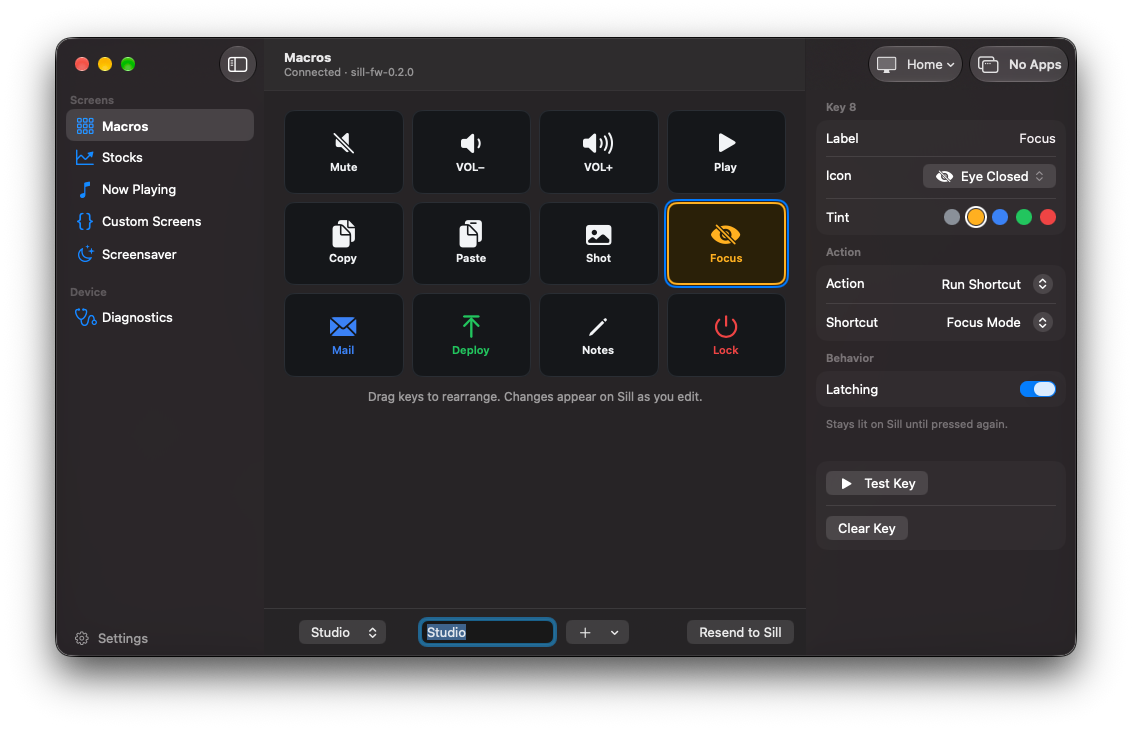
A touchscreen macropad for your Mac. Twelve keys you set up however you like, plus what's playing, the markets, and screens you write yourself.
Keys that follow your work
Each key sends a shortcut, a media key or a line of text, opens an app or a URL, or runs a Shortcut. Link a profile to an app and the grid changes with whatever is in front.
Works like a keyboard
Sill plugs in over USB and types like a standard keyboard, so your shortcuts land in any app. Unplug it, plug it back in, and your layout comes right back.
More than keys
Swipe over for what's playing, four stock quotes with sparklines, or a full calculator. When you step away it turns into a clock or a slideshow of your photos.
Put anything on it with a JSON file.
Drop a file in Sill's Screens folder and it becomes a page on the device. Lay out text, cards, bars, sparklines and buttons, and fill them from a shell command or a URL. Edits show up as you save.
A screen file can run commands on your Mac, so Sill shows you exactly what a new file will do and draws nothing live until you allow it.
The bundled sill command puts a message on the screen from any script: a finished build, a failed test, a long download.
// ~/Library/Application Support/Sill/Screens/system.json
{
  "title": "System",
  "sources": {
    "load": {
      "shell": "sysctl -n vm.loadavg | awk '{print $2}'",
      "every": 5
    }
  },
  "widgets": [
    { "type": "card", "x": 8, "y": 62, "w": 148, "h": 96,
      "caption": "LOAD", "value": "{{load}}" }
  ]
}
# tell the desk when the build is done
make test; sill notify "Tests finished" --seconds 10